backup Roswaal has moved to roswaal.app. A project kept here stays here: download it as a .zip and open it there. Folders on your computer open there too. Go to roswaal.app

And it's completely free, forever.

Graphs live as .nodescript files and compile to .luau that Rojo syncs like any other source file. No plugin or runtime, nothing of Roswaal stays in your game. And it's 0BSD, so Roswaal and anything you make with it are yours to keep, sell, modify or walk away with.

Install it and it runs locally, on your repository. Or open the preview on a computer, tablet or phone, with nothing to install and your project kept in your browser.

See what it writes

The graph

A player joinsOn its docs page
Script StartGet ServicePlayersPlayersServiceGet EventSignalInstancePlayerAd…EventConnect EventBodySignalConnectionplayerPrintValue

The Luau it writes

Roblox
local Players = game:GetService("Players")

Players.PlayerAdded:Connect(function(player: Player)
	print(player)
end)

The graph

A loopOn its docs page
Script StartƒxLuau ExpressionscoresFor EachBodyTableCompletedKeyValuePrintValue

The Luau it writes

Any Luau
for key, value in pairs(scores) do
	print(value)
end

The graph

Read a fileOn its docs page
Script Startfs.readFilefs.readFileResultstringREADME.mdpathLengthnumberValueFormatstringREADME.m…FormatValuePrintValue

The Luau it writes

Lune
local fs = require("@lune/fs")

print(string.format("README.md is %d characters.", #fs.readFile("README.md")))

Both halves come from the same graph, by the same compiler the editor runs, so the picture cannot show a wiring the code does not have.

That is what it writes. Take the tour of the editor that writes it, starting with the lines each node wrote.

Take the tour

Each part working, to try here.

1 / 110.17.0

Which lines are whose

Select nodes and press P to see the lines they wrote, picked out of the real generated file. A pure node has no line of its own, so the preview lights the line its value ends up in.

Then 0.33.0 the whole script with nothing selected.

P, with or without a selection

Try it: Click a node in the graph. Shift-click to add another, or click the canvas to preview the whole script.

On its docs page
Script StartGet ServicePlayersPlayersServiceGet EventSignalInstancePlayerAd…EventConnect EventBodySignalConnectionplayerWait⏳Elapsednumber1SecondsGet PropertyInstanceNamePropertyConcatenatestringWelcome, ABPrintValue
Selection preview 1 node · 2 lines
⋯8local Players = game:GetService("Players")9 10Players.PlayerAdded:Connect(function(player: Player)11	task.wait(1)12	print("Welcome, " .. player.Name)13end)14 
2 / 110.1.0

Find a node by name

Right-click the canvas and type. Nodes are found by their names, by what other tools call them (sleep finds Wait), and by the Luau they write (if finds Branch).

Then 0.45.0 the Luau it writes, 0.74.0 other names.

Right-click the canvas

Try it: Type sleep into the search, then walk the list with ↑ ↓.

On its docs page

3 / 110.50.0

Or by how it looks

The node picker lists the same nodes and draws each one as you reach it, in your wire style, for when you remember a node's shape better than its name. Press and hold with two fingers to open it on a tablet.

Then 0.74.0 two fingers on a touch screen.

Ctrl + Right-click

Try it: Point at a node in the list, or walk it with the arrow keys.

On its docs page
17
Events
Roblox
Flow
Threads
Math
Strings
Tables
Logic
Debug
Values
Get EventSignalInstanceTouchedEvent
Get Event
Roblox

Reads a signal off an instance. Same access as Get Property, but typed as a signal so it wires straight into Connect Event.

↑ ↓ walkEnter placeEsc close

4 / 110.90.0

Code that knows its names

Rest on a name in Code Block or a Luau file and the editor says what it is: a local and its type, a parameter, a method with its signature and a link to where Roblox documents it.

Then 0.93.0 in .luau files, 0.94.0 types and methods.

Hover, or move the caret onto a name

Try it: Hover stats, IsA or award. Tab steps through the names.

On its docs page

Coins.server.luau

Roblox
local Players = game:GetService("Players")
local coins = 0

local function award(player: Player, amount: number)
	coins += amount
	local stats = player:FindFirstChild("leaderstats")
	if stats and stats:IsA("Folder") then
		print(player.Name, coins)
	end
end

Players.PlayerAdded:Connect(function(player)
	award(player, 10)
end)

5 / 110.89.0

Completion that knows Roblox

As you type Luau, the editor offers what fits where the cursor is: Roblox's classes in Instance.new and :IsA, its services in :GetService, and a datatype's constructors and constants after its dot.

Type, then ↑ ↓ and Enter or Tab

Try it: Pick where to ask, then keep typing in the box. Enter takes the option that is lit.

On its docs page
local part = Instance.new("")
  • Pants
  • Part
  • ParticleEmitter
  • PartOperation
  • PartOperationAsset
  • Path2D
  • PathfindingLink
  • PathfindingModifier

The editor offers 321 here, narrowed as you type.

6 / 110.104.0

Your own docs, as you write them

Doc comments above a function show in its hover: prose, examples, parameters and returns. Moonwave's @class, @prop and @interface are read too, and the tags are coloured where you write them.

Then 0.110.0 @class, @prop and @interface.

--[=[ ]=] or --- above a declaration

Try it: Hover Inventory, capacity and add.

On its docs page

Inventory.luau

Roblox
--[=[
	@class Inventory
	What a player is carrying, by item name.
]=]
local Inventory = {}

--[=[
	@prop capacity number
	@within Inventory
	How many items fit.
]=]
Inventory.capacity = 20

--[=[
	Adds an item, unless the inventory is full.

	```lua
	Inventory.add(bag, "Sword")
	```

	@param bag { string } -- the items held now
	@param item string -- what to add
	@return boolean -- whether it fitted
]=]
function Inventory.add(bag: { string }, item: string): boolean
	if #bag >= Inventory.capacity then
		return false
	end
	table.insert(bag, item)
	return true
end

return Inventory

7 / 110.103.0

From the DataModel into your code

The Project panel's DataModel tab lists your place as Studio's Explorer does. Drag an instance into Code Block: on a blank line it becomes a whole local, anywhere else the path alone, starting from a local that already holds part of the way.

Then 0.128.0 dragged into Code Block, 0.151.0 from the locals in scope.

Drag a row, or Enter on it and then on where it goes

Try it: Drag Config onto the blank line: it starts from Shared. Then try Shared itself, or Door into print().

On its docs page
Filter by name or class
WorkspaceWorkspace
HouseModel
DoorPart
ReplicatedStorageReplicatedStorage
SharedFolder
ConfigModuleScript
ServerScriptServiceServerScriptService
DoorsScript
StarterPlayerStarterPlayer
Code Block
local Shared = game:GetService("ReplicatedStorage").Shared

local function openDoor()
	local Config = Shared.Config
	print(workspace.House.Door)
end

Drag a row onto the blank line or into print().

8 / 110.107.0

Wally packages, in the tree

wally.toml sits in Graph content with each package it lists and the version installed, and Packages shows under Compile content. Add from Wally… on its menu installs a package with what it depends on.

Then 0.112.0 Add from Wally, 0.113.0 Remove a package.

Right-click wally.toml

Try it: Switch to after Add from Wally… and Flux arrives with its version.

On its docs page

9 / 110.140.0In progress

Luau in, graph out

Import as graph turns a .luau file's statements into nodes; what has no node yet stays as Luau text, and comments become comment boxes. Still in progress, so test what you import.

Then 0.143.0 Verbatim, Tidy and Modern, 0.166.0 names and types as written, 0.167.0 laid out in rows, 0.169.0 the library's own nodes, 0.171.0 event handlers and threads.

Right-click a .luau file

Try it: Tap a line of either file, or a node, to see what it became. Verbatim keeps one chain, Tidy cuts it into rows, and Modern writes the and … or line as an if-expression.

On its docs page
Script StartInitialize Variablecoins0ValueInitialize VariablebonusValueInitialize Variablerounds5ValueiBody1FirstCompletedLastIndexnumber1SteproundsSet VariablecoinsAdd (+=)Initialize VariabledoubledValueƒxLuau Expressioncoins * 2Initialize VariablelabelValueƒxLuau Expressionbonus and "Bonus round" or "Round"PrintValueValue 2labeldoubledWait⏳Elapsednumber1Seconds{ }Code Blockrepeat coins -= 1until coins <= 20BranchTrueConditionFalseƒxLuau Expressioncoins > 10PrintEnough c…ValueWarnNot enou…Value
Coins.server.luau
1local coins = 02local bonus = true3local rounds = 54 5for i = 1, rounds do6	coins += i7end8 9local doubled = coins * 210local label = bonus and "Bonus round" or "Round"11print(label, doubled)12task.wait(1)13 14repeat15	coins -= 116until coins <= 2017 18if coins > 10 then19	print("Enough coins")20else21	warn("Not enough coins")22end
What the graph writes
1local coins = 02local bonus = true3local rounds = 54 5for i = 1, rounds do6	coins += i7end8 9local doubled = coins * 210local label = bonus and "Bonus round" or "Round"11print(label, doubled)12task.wait(1)13 14repeat15	coins -= 116until coins <= 2017 18if coins > 10 then19	print("Enough coins")20else21	warn("Not enough coins")22end

12 of 13 statements are nodes. Kept as code: repeat loop ×1.

Script StartSequenceThen 0Then 1Initialize Variablecoins0ValueInitialize VariablebonusValueInitialize Variablerounds5ValueiBody1FirstCompletedLastIndexnumber1SteproundsSet VariablecoinsAdd (+=)Initialize VariabledoubledValueƒxLuau Expressioncoins * 2Initialize VariablelabelValueƒxLuau Expressionbonus and "Bonus round" or "Round"PrintValueValue 2labeldoubledWait⏳Elapsednumber1Seconds{ }Code Blockrepeat coins -= 1until coins <= 20BranchTrueConditionFalseƒxLuau Expressioncoins > 10PrintEnough c…ValueWarnNot enou…Value
Coins.server.luau
1local coins = 02local bonus = true3local rounds = 54 5for i = 1, rounds do6	coins += i7end8 9local doubled = coins * 210local label = bonus and "Bonus round" or "Round"11print(label, doubled)12task.wait(1)13 14repeat15	coins -= 116until coins <= 2017 18if coins > 10 then19	print("Enough coins")20else21	warn("Not enough coins")22end
What the graph writes
1local coins = 02local bonus = true3local rounds = 54 5for i = 1, rounds do6	coins += i7end8 9local doubled = coins * 210local label = bonus and "Bonus round" or "Round"11print(label, doubled)12task.wait(1)13 14repeat15	coins -= 116until coins <= 2017 18if coins > 10 then19	print("Enough coins")20else21	warn("Not enough coins")22end

12 of 13 statements are nodes. Kept as code: repeat loop ×1.

Script StartSequenceThen 0Then 1Initialize Variablecoins0ValueInitialize VariablebonusValueInitialize Variablerounds5ValueiBody1FirstCompletedLastIndexnumber1SteproundsSet VariablecoinsAdd (+=)Initialize VariabledoubledValueƒxLuau Expressioncoins * 2Initialize VariablelabelValueƒxLuau Expressionif bonus then "Bonus round" else "Round"PrintValueValue 2labeldoubledWait⏳Elapsednumber1Seconds{ }Code Blockrepeat coins -= 1until coins <= 20BranchTrueConditionFalseƒxLuau Expressioncoins > 10PrintEnough c…ValueWarnNot enou…Value
Coins.server.luau
1local coins = 02local bonus = true3local rounds = 54 5for i = 1, rounds do6	coins += i7end8 9local doubled = coins * 210local label = bonus and "Bonus round" or "Round"11print(label, doubled)12task.wait(1)13 14repeat15	coins -= 116until coins <= 2017 18if coins > 10 then19	print("Enough coins")20else21	warn("Not enough coins")22end
What the graph writes
1local coins = 02local bonus = true3local rounds = 54 5for i = 1, rounds do6	coins += i7end8 9local doubled = coins * 210local label = if bonus then "Bonus round" else "Round"11print(label, doubled)12task.wait(1)13 14repeat15	coins -= 116until coins <= 2017 18if coins > 10 then19	print("Enough coins")20else21	warn("Not enough coins")22end

12 of 13 statements are nodes. Kept as code: repeat loop ×1. Written in newer syntax: 1.

10 / 110.121.0

The work fills the window

Controls float over the graph in groups. On a computer the panels are cards that dock, fold and take tabs; on a tablet they open from the groups along the top; on a phone they are sheets from a bar along the bottom.

Then 0.122.0 tabs and folding, 0.130.0 the panels redrawn.

The same editor on any screen

Try it: Switch between Computer, Tablet and Phone. Each is the editor itself, on that screen, with the same graph open.

On its docs page
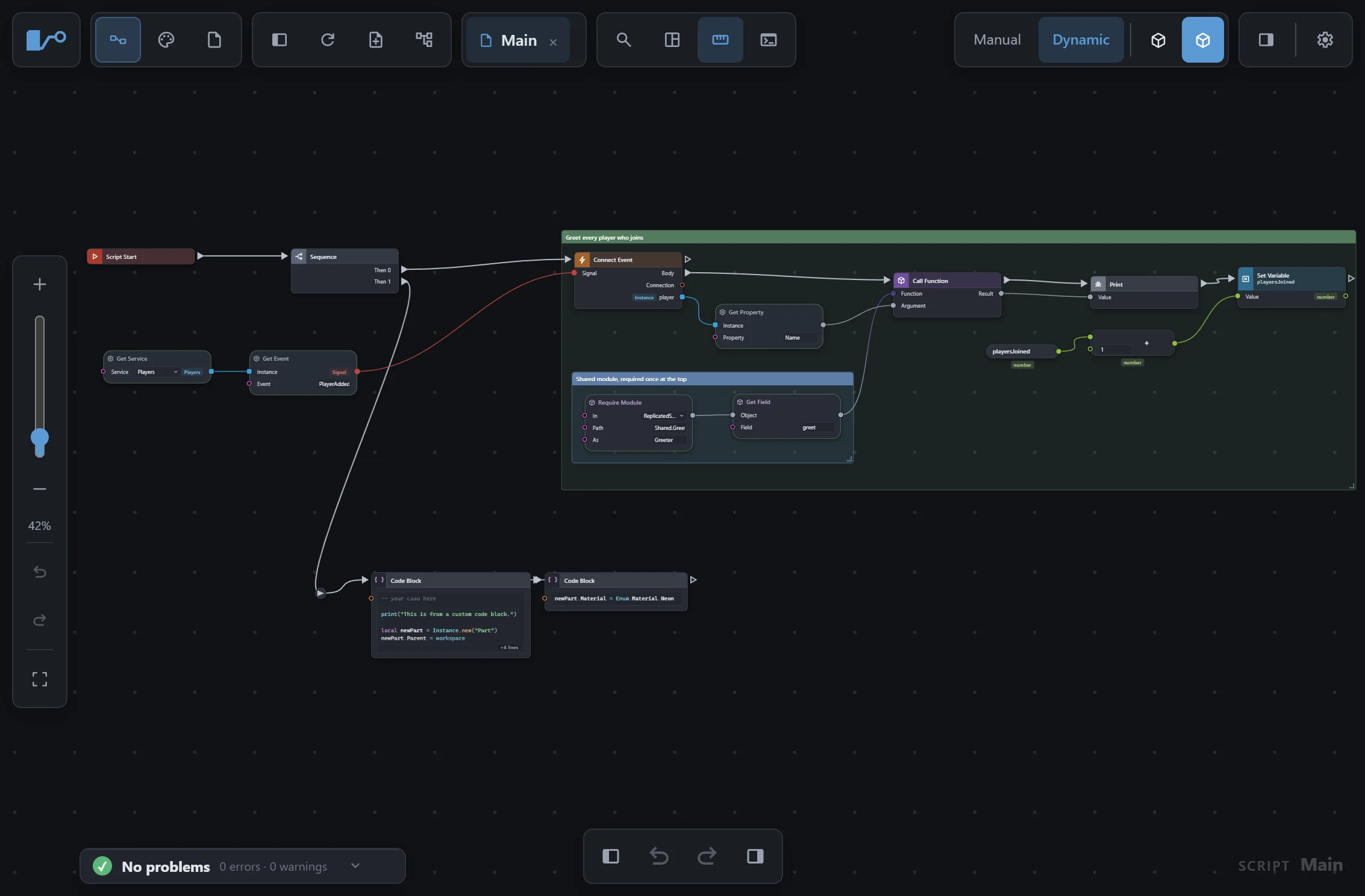
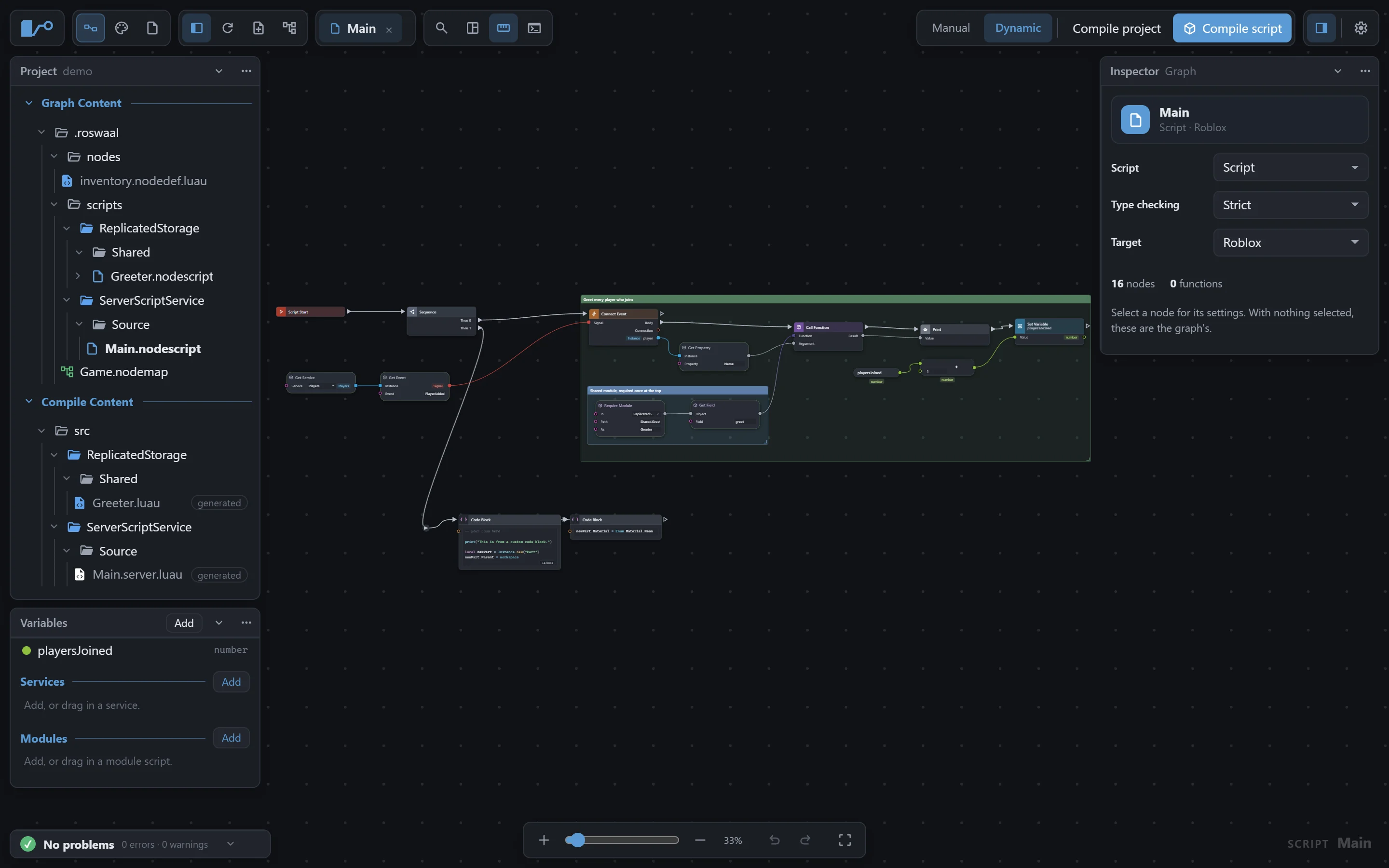
The editor on a computer: the Project and Variables cards docked on the left, the Inspector on the right, and the graph between them.
The editor on a tablet: the controls in groups along the top, the zoom strip at the side, and the graph filling the screen.
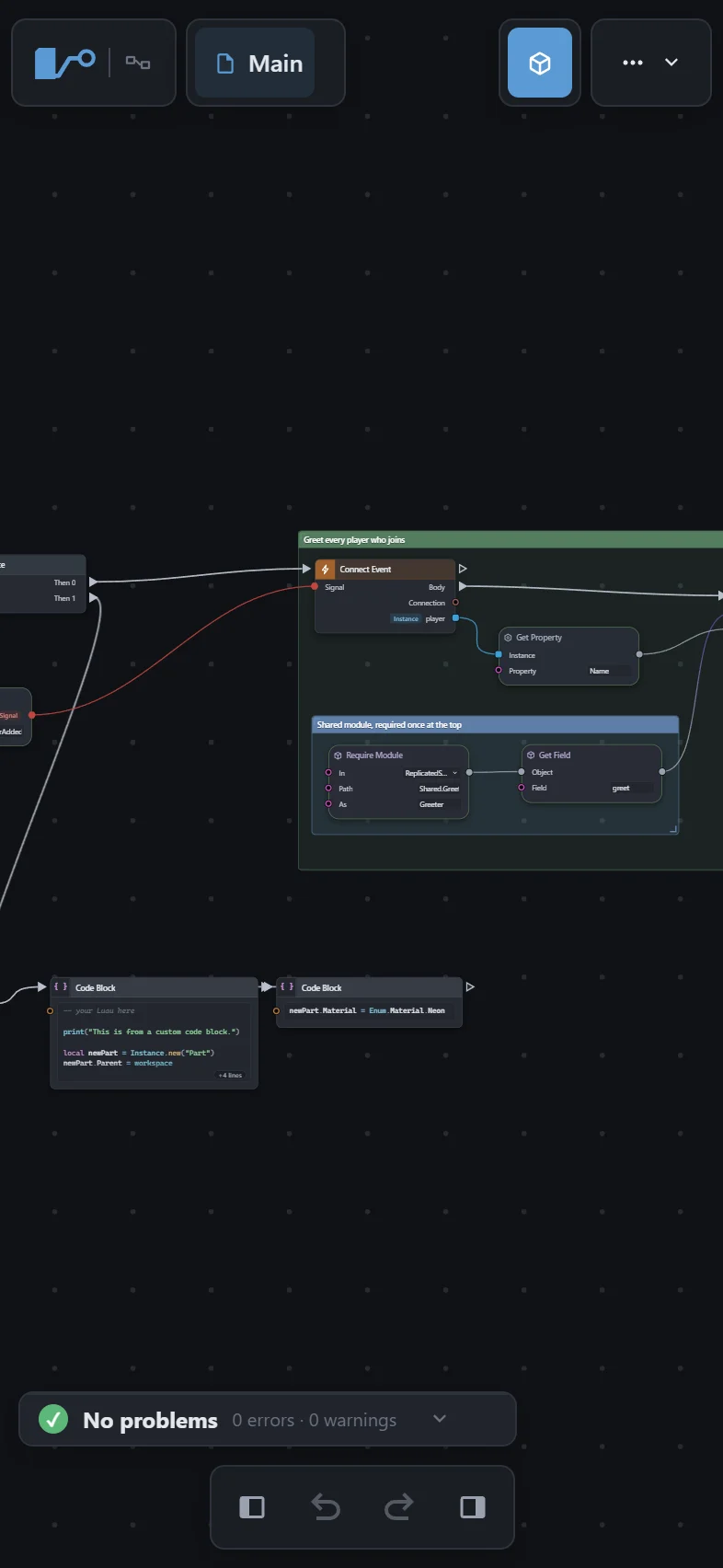
The editor on a phone: the graph's name at the top, the graph zoomed to read, and a bar along the bottom.

11 / 110.144.0

A menu for each kind of row

Every context menu is the same menu: it opens over everything, stays on screen, and is divided where its entries are different kinds of thing. What it offers depends on what you opened it on: a folder, a graph, Wally's file, Luau you wrote, or Luau Roswaal writes.

Right-click, then ↑ ↓ Enter Esc

Try it: Right-click each row in the tree. Only Luau you wrote, and a folder holding some, offer to import it as graphs, and only wally.toml offers packages.

Graph Content
.roswaal
Events.nodescript
Signal1.5.0
Compile Content
src

Right-click a row, or press Enter on it: each kind of row has its own menu.

Why it holds up

You own all of it

A .nodescript is a file in your repository: commit it, branch it, review the diff. Roswaal is 0BSD, with no attribution and nothing to ask permission for.

The output is ordinary Luau

Typed and commented, and run through stylua when it is installed, at your project's indent. Roswaal refuses to overwrite a generated file you have edited by hand.

Try it on your own project

On a computer, the preview opens a real folder and writes into it, so you can find out whether this fits your game before installing anything.

Inside the editor

Search literally, or visually0.1.0

Right-click the canvas to search nodes by name. Ctrl + Right-click opens a picker that draws each node as you walk the list, since 0.50.0.

See it in the tour

Events, already typed0.119.0

On Event lists the events a part's class has, and the handler's parameters arrive typed. Connect Event fills them in too.

Code Block, and Luau Expression0.1.0

Write Luau where writing Luau is simpler, and wrap code you already have instead of rebuilding it as nodes. The text is emitted verbatim.

Custom nodes, made your way0.34.0

In Node Design, wire a node's logic from nodes and watch the Luau appear, or write the template by hand. Or write a pack yourself, in JSON or Luau.

Places and Rojo projects0.98.0

Open a .rbxl as a project with its scripts, and export back into the place. Since 0.106.0, a default.project.json becomes a node map that makes the folders Rojo syncs.

Preview anything, any time0.17.0

P shows what the graph in front of you compiles to: a whole script, one function, or only the nodes you have selected, read from the real output.

See it in the tour

Panels that float and dock0.121.0

Every window floats its controls over the work. Cards dock to an edge, share it, take tabs and fold away on a computer or an iPad, and become sheets on a phone.

See it in the tour

Documented, node by node0.4.0

A page for every node with its graph and its Luau, Ctrl + K to it from anywhere, and a ✎ on each page to suggest an edit. Plus Coming from Blueprints.

Works with what you have

Lately

From the release notes, newest first.

Every release

What is planned

Plans rather than promises, in no particular order, and with no dates. Any of it may change, arrive in a different shape, or be dropped — and none of it is in the version you can try today.

Runtime errors that point at a node

The compiler already writes down which node produced which line. An error at Main.server.luau:42 could light up the node that wrote line 42.

Overriding a built-in node

Keep a node's default behaviour and let a project replace its internals. The open question is what should happen when the built-in changes underneath an override.

Roswaal 0.200.0 — Properties renames instances. Report something Release notes Source on GitHub Attributions and licence